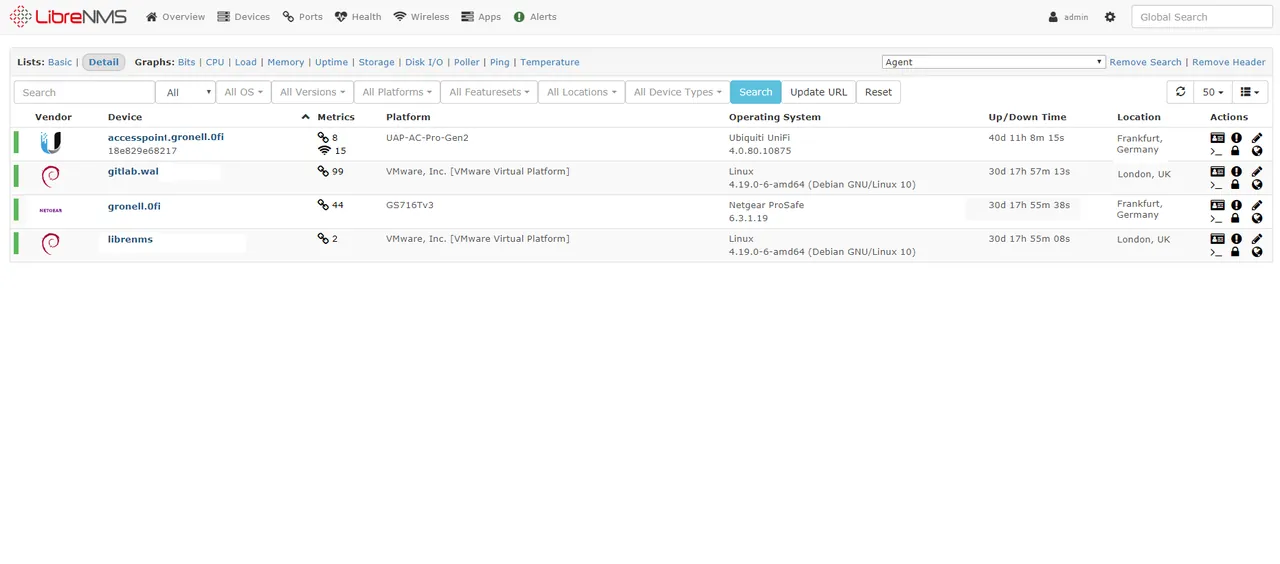
Give LibreNMS the SNMP credentials and the IP of one core switch, enable neighbor discovery, and go get coffee. When you come back it has usually walked LLDP and CDP tables across half the network, added the access switches and the firewall, and started drawing traffic graphs for every port. For a network engineer who has spent weekends hand-writing interface checks, that first hour is genuinely delightful. The questions that matter come later: how many devices can one poller handle, and how do you stop the alerts page from filling with every flapping edge port?
What LibreNMS does
LibreNMS is a PHP (Laravel) network monitoring system that forked from Observium in 2013 and has grown into a large community project. It is SNMP-first: devices are discovered and polled over SNMP v1, v2c or v3, and the project maintains OS definitions that teach it how to read hundreds of vendor platforms, from Cisco and Juniper to MikroTik, Ubiquiti, Aruba and many printers and UPS units.
Architecture in brief: a MySQL/MariaDB database stores inventory, state and events; RRDtool files store time-series metrics; a Python-based dispatcher service (or the older cron jobs) runs discovery and polling, by default every five minutes; the web UI shows graphs, maps, inventory and alerts. Linux hosts can be monitored via SNMP plus extend scripts, and there are application modules for things like Nginx, MySQL and Postfix.
Useful add-ons include Oxidized integration for configuration backups, a network weathermap plugin, syslog and SNMP trap handling, and a billing module for 95th-percentile transit calculations.
Where it earns its keep
- Auto-discovery that actually works. CDP, LLDP, OSPF, BGP and ARP-based discovery add devices with minimal input, and interfaces, sensors, VLANs and routing sessions are detected per device.
- Vendor coverage. The OS definitions are community-maintained YAML, so support for new hardware often lands quickly, and you can add your own.
- Graphs everywhere. Every port, optic reading, temperature sensor and CPU has a graph without configuration.
- Useful network views. Port search by MAC or IP, neighbor maps, and BGP session tables answer day-to-day troubleshooting questions fast.
Where it falls short, and who should skip it
Poller sizing is on you. With a five-minute interval, every device must be fully polled within that window. Large chassis switches with hundreds of ports and sensors take tens of seconds each. Past a few hundred devices, you will need distributed pollers with a shared rrdcached and a lock/queue backend such as Redis. The lnms tooling and the poller health page show whether you are keeping up; check them weekly. Our sizing guide explains how to estimate this.
RRD disk I/O. Tens of thousands of RRD files updated every five minutes mean lots of small random writes. SSD or NVMe storage and rrdcached are close to mandatory at scale.
Alerting needs work. The default rules are broad. Out of the box you may be alerted for every access port going down when a laptop is unplugged. Plan to write rules with conditions on port type and description, use device dependencies, and set up alert templates and transports (email, Slack, Teams, PagerDuty and others). The alert noise guide covers the patterns.
Servers and applications are second-class. Linux monitoring over SNMP extend scripts works, but it is not as rich as a dedicated agent. Windows coverage is limited.
Rolling updates. By default LibreNMS updates itself daily from the Git repository. That keeps you current but means changes arrive without a scheduled window; many teams switch to monthly release tags for predictability.
Skip LibreNMS if your estate is mostly servers and applications, or if you need sub-minute polling on many devices.
Who it suits
Network teams, ISPs, campuses and MSPs who need a broad, graph-rich view of switches, routers, wireless and power gear across many vendors, and are comfortable running a Linux LAMP-style stack. It often sits alongside a server-focused tool like Zabbix or Icinga.
Licensing and cost
LibreNMS is licensed under GPLv3 and has no license fee, no paid edition and no feature gating. It is a community project without a commercial vendor behind it, so support comes from the documentation, the community forum and Discord, or third-party consultants. Budget for the hardware (fast disks especially) and the time to tune polling and alerts.
How it compares
PRTG offers a comparable network view with vendor support and a Windows-based core server, priced per sensor; our LibreNMS vs PRTG page goes through the trade-offs. Zabbix covers servers better but needs more template work for network gear. Checkmk discovers SNMP devices too and adds strong server coverage. Commercial network-focused suites include OpManager and SolarWinds NPM. See the full SNMP and network device monitoring table.
Getting it safely
Follow the project’s official documentation, which deploys from the LibreNMS GitHub repository and pulls PHP dependencies through Composer with integrity checks. An official Docker image is also maintained by the project. Avoid prebuilt VM images from unknown publishers. Before adding devices, configure SNMPv3 with authentication and privacy on your own gear; our SNMPv3 setup guide explains how. More on verification is on our where to get monitoring software page.
FAQ
How many devices can one LibreNMS server poll?
It depends on device size, not just count. A few hundred typical access switches on a well-specified single server is common; beyond that, add distributed pollers and measure poller run times.
Can I change the five-minute polling interval?
Yes, one-minute polling is supported, but it requires recreating RRD files and roughly five times the poller capacity. Most teams keep five minutes and rely on SNMP traps or syslog for faster signals.
Does LibreNMS support SNMPv3?
Yes, including authentication and encryption. Using v3 on your own devices is strongly recommended over community strings.
Is LibreNMS the same as Observium?
No. It forked from Observium in 2013 and has developed independently since, with a different license and community-led governance.